What if something as ordinary as charging your iPhone could help reduce your environmental impact? It might sound like a small contribution, but everyday habits can add up when it comes to protecting the environment. That’s precisely the idea behind Apple’s Clean Energy Charging feature. Instead of immediately charging your iPhone whenever you plug it in, this feature can delay charging until electricity produced with lower carbon emissions is available.
Think of it as your iPhone being a little more selective about when it gets its energy. Your battery might not have an opinion about where its electricity comes from, but the environment certainly does!
Why does this matter? According to Our World in Data, the average person worldwide was responsible for approximately 4.74 tonnes of carbon dioxide emissions in 2025. In the United States, that figure was considerably higher, at around 14.5 tonnes per person. These figures cover emissions from fossil fuels and industrial processes, including electricity generation, transportation and heating.
While changing your iPhone’s charging habits won’t solve the climate crisis, it is one small adjustment you can make without completely changing your daily routine.
Here’s how to enable Clean Energy Charging on your iPhone.
How to Enable Clean Energy Charging on Your iPhone
Before getting started, make sure your iPhone is running iOS 16.1 or later. The exact location of the setting depends on your iPhone model.
Step 1: Go to Battery Settings
On your iPhone Home Screen, tap the Settings icon.
Scroll down and select Battery.
If you’re using an iPhone 14 or an earlier model, tap Battery Health & Charging. On iPhone 15 models and later, look for the Charging option.
Step 2: Enable Clean Energy Charging
Look for the Clean Energy Charging option.
Make sure the toggle next to it is switched on.
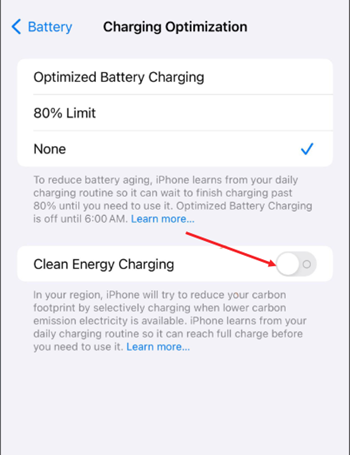
Your iPhone can now use local electricity carbon-emission forecasts to determine when cleaner electricity is available.
Step 3: Turn On Location Services
There’s one more thing you need to do to make this feature work.
Go back to Settings, select Privacy & Security, and then tap Location Services.
Make sure Location Services is switched on.
Step 4: Enable System Customization
While you’re still in the Location Services settings, scroll down and select System Services.
Look for System Customization and make sure it is enabled.
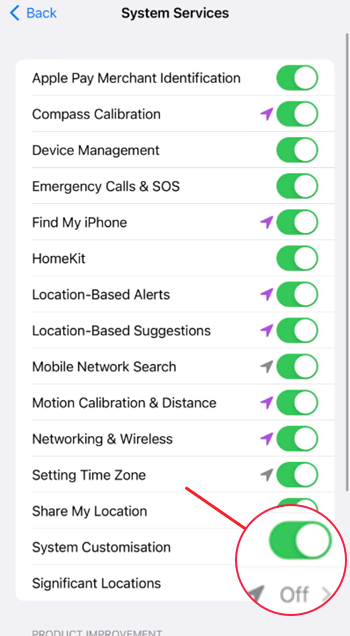
Step 5: Enable Significant Locations & Routes
In the same System Services screen, look for Significant Locations & Routes.
Make sure this setting is switched on as well.
That’s it! Your iPhone now has the necessary settings to use Clean Energy Charging.
Why Does Clean Energy Charging Need Location Services?
You might be wondering why a feature designed to charge your battery needs to know your location.
The explanation is fairly straightforward.
Electricity generation varies from one region to another. Depending on your location and the time of day, the electricity supplied to your home might come from different sources, including renewable energy and fossil fuels.
Apple uses local carbon-emission forecasts to determine when electricity with lower carbon emissions is available. Location Services helps your iPhone obtain the information needed for this feature.
Apple also explains that Clean Energy Charging works alongside Optimized Battery Charging to learn your charging habits. It is designed to work at locations where you regularly charge your iPhone for extended periods, such as your home or workplace.
According to Apple, the location information used for this feature isn’t sent to Apple.
What If You Need to Charge Your iPhone Immediately?
Clean Energy Charging may occasionally pause charging when cleaner electricity is expected to become available later.
Don’t worry. Your iPhone won’t leave you staring at a nearly empty battery indefinitely.
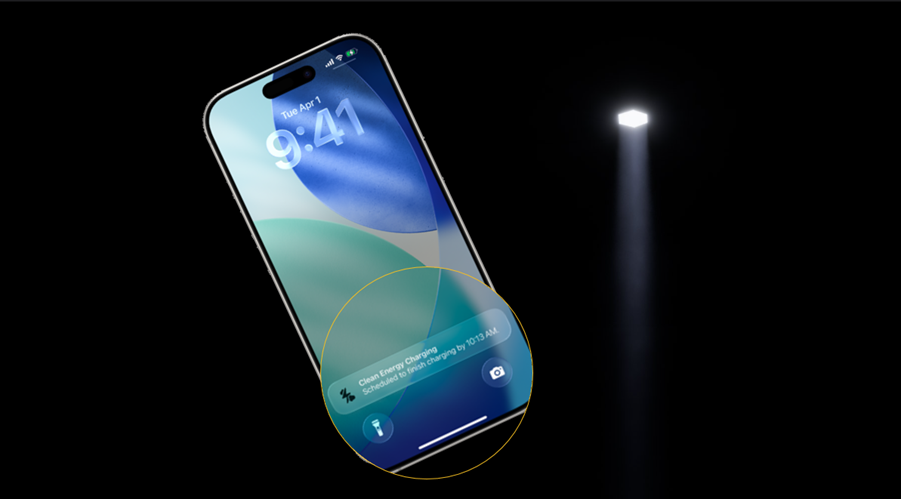
When charging is suspended, you’ll receive a notification on your Lock Screen showing when your iPhone is expected to reach a full charge.
If you need your phone charged immediately, simply touch and hold the notification and tap Charge Now.
This overrides the delay and allows your iPhone to continue charging without waiting for the cleaner-energy forecast.
What Exactly Is a Carbon Footprint?
A carbon footprint refers to the total greenhouse gas emissions associated with an individual, activity, product, organization or event.
These emissions include gases such as carbon dioxide (CO₂) and methane, which contribute to global warming by trapping heat in the Earth’s atmosphere.
Everyday activities such as driving a car, using electricity, travelling by air and manufacturing the products we consume contribute to our collective carbon footprint.
The good news is that reducing it doesn’t always require dramatic lifestyle changes. Being mindful of how we consume electricity, choosing energy-efficient appliances and making small adjustments to our daily habits can all contribute to the effort.
Apple’s Clean Energy Charging is one such example. It won’t single-handedly save the planet, but it’s a useful reminder that even our everyday technology habits can play a part in building a more sustainable future.