A few days ago, I was waiting for an important call about a job opportunity when my iPhone stayed completely silent. No ring, no vibration even though silent mode was definitely off. That moment of confusion quickly turned into frustration, and I realized this is something many iPhone users deal with, often without knowing why. After digging into the issue and testing the most reliable fixes, I put together this guide to explain what causes the problem and how you can get your iPhone ringing properly again.
How to fix iPhone not ringing for incoming calls
On paper, this seems straightforward: silent mode off means your iPhone should ring for incoming calls. However, multiple factors can cause your phone to stay silent. Sometimes it’s as simple as volume turned down, sometimes a hidden software setting, and other times a hardware problem.
Some very uncommon scenarios include misconfiguring of Ringtone and Alerts settings under Sounds & Haptics alongside checking of wrong option under Input section of the same (Sounds & Haptics). Knowing these possibilities helps you troubleshoot effectively rather than guessing randomly.
Start by checking the ringer volume: press the volume-up button on the side of your iPhone, keeping in mind that the ringer volume is separate from media volume and must be high enough for calls to ring. If the volume is fine and the issue persists, open Settings and scroll to Sounds & Haptics to continue troubleshooting.
Tap the side arrow to expand the section and make sure Change with Buttons is turned off. When this toggle is on, the physical volume buttons adjust the ringer and alert volume (calls, texts, notifications) along with other audio; when it’s off, the ringer/alert volume remains at the level you set in Sounds & Haptics and the buttons only change media/app volume.
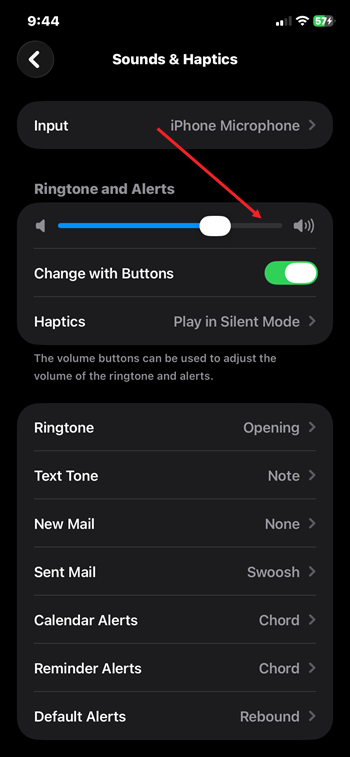
Also check that the Automatic option under Input in Sounds & Haptics is enabled. This setting determines which microphone or audio input the iPhone uses for calls and recordings, ensuring the correct source is selected for sound capture.

Most cases of “iPhone not ringing for incoming calls even when silent mode is off” result from overlooked settings—like Focus/Do Not Disturb modes—or simple software glitches best resolved by restarting or updating iOS. Digging into specific settings can also help uncover hidden causes.
By methodically working through these areas, you’ll restore your iPhone’s ringing reliability and avoid missing critical calls. A silent phone can be stressful, but armed with these insights and fixes, you can stay connected when it matters most.