
Last updated on June 24th, 2026 at 03:17 pm
Downloading movies and shows for offline viewing is one of the best features of streaming services like Disney+ Hotstar. Whether you’re preparing for a long flight, a train journey with patchy internet, or simply trying to save mobile data, the download button can feel like a lifesaver.
That’s why it’s especially frustrating when Disney+ Hotstar suddenly refuses to download content. Instead of saving your favorite show for later, the app throws up an error message that says:
“Download unavailable. Selected content was deleted in System Settings or by the operating system.”
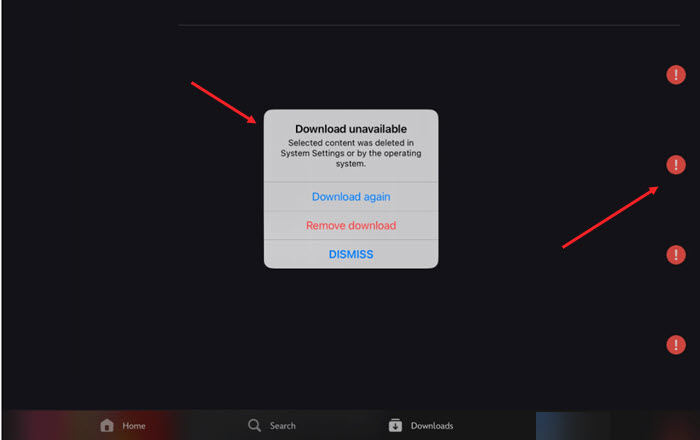
Fix: HotStar Download unavailable
At first glance, the message doesn’t make much sense. You check your phone’s storage and discover you still have several gigabytes of free space available. The download starts, appears to be making progress, and then sits there for an hour or two before eventually failing. It’s a bit like watching a delivery driver circle your neighborhood all afternoon only to mark the package as “undelivered.”
The good news is that this error usually isn’t caused by a lack of storage. In many cases, the problem is linked to the app’s download cache, storage permissions, corrupted temporary files, or restrictions imposed by your device’s operating system.
If Disney+ Hotstar downloads aren’t working on your device, here are a few troubleshooting steps worth trying before you give up on your offline binge-watching plans.
Toggle Off Download Over Wi-Fi Only
Launch the Disney Plus app and sign into your account.
Go to your profile icon and tap to select it or click it.
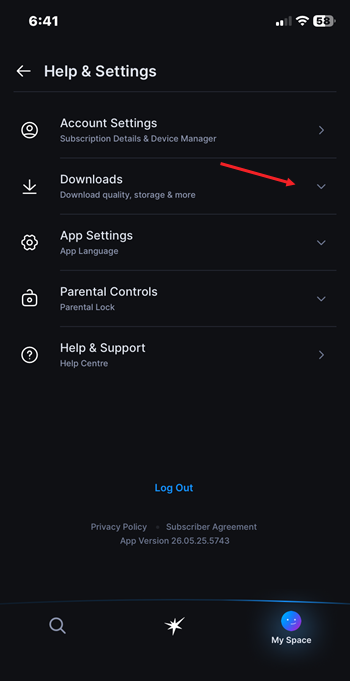
Expand Help & Settings menu.
Tap the drop-down button next to Downloads setting.
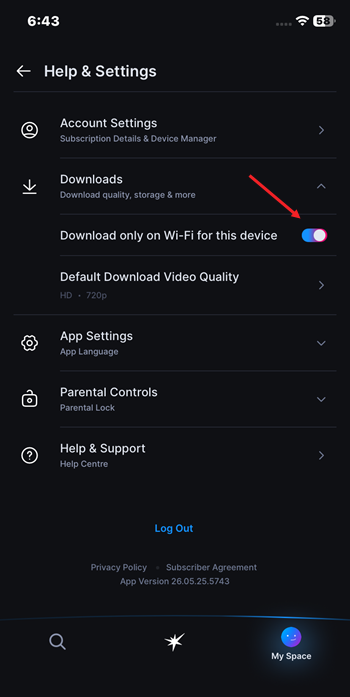
Toggle off the Download only on Wi-Fi for this device.
Clear the app cache
Corrupted cached files can prevent downloads from completing successfully. So, if you are using a mobile, particularly running on Android,
- Open Settings.
- Go to Apps.
- Select Disney+ Hotstar.
- Tap Storage.
- Choose Clear Cache.
There’s nothing to worry as this action won’t delete your account or subscription details.
Working through the troubleshooting steps above should help get Disney+ Hotstar downloads working again, so you can return to the important task of deciding what to watch next. Actually, that’s a challenge that’s usually much harder than fixing the download button.